Getting started with laser making doesn’t have to mean breaking the bank or compromising on what the machine can actually do. Under a thousand dollars, there’s a complete, capable setup waiting — one that handles real projects, grows with your skills, and doesn’t leave you outgrowing your equipment before you’ve found your creative footing.
What a Smart Beginner Setup Actually Needs
- A machine that handles wood, acrylic, and leather cleanly
- Software that doesn't require an engineering degree to navigate
- Safety features that protect first-time users from costly mistakes
- Room to expand without replacing the entire setup
The entry-level laser market in 2026 looks nothing like it did three years ago. Precision, software intelligence, and material versatility have all moved decisively downmarket — and xTool has been at the front of that shift. Today’s sub-$1,000 machines deliver output quality that would have required a mid-range professional setup just a few years ago, making right now the best possible moment to start a laser making journey.
Material versatility
Should handle wood, leather, acrylic, and coated metals without extra modules
Beginner-friendly software
Pre-set profiles reduce trial and error for first-time success
Built-in safety
Flame detection, emergency stop, and enclosure should be standard, not optional
Choosing the right first machine sets the trajectory of your entire making journey. A setup that’s genuinely capable from day one builds confidence fast, opens up sellable project categories early, and removes the frustration ceiling that causes so many beginners to abandon the craft before they’ve had a real chance to explore what laser making can produce for them.
Budget laser machines now quietly deliver professional-grade results, collapsing the old gap between beginner tools and studio setups.
Cheap, not childish
Under $1,000 and Overdelivering: The Best Beginner Setups Right Now
The sweet spot in xTool’s lineup sits right where beginner accessibility meets genuine creative capability — machines that don’t ask you to choose between affordability and output quality. These picks consistently earn top marks from first-time buyers for ease of setup, material range, and the kind of day-one results that turn a curiosity into a committed creative practice worth building a real business around.
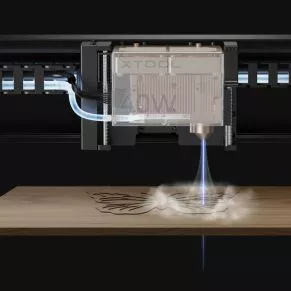
Bestseller
$169.00
Automatic airflow clean cutting system
This smart air assist system delivers precise, adjustable airflow to improve laser cutting and engraving quality on the M1 Ultra. It reduces smoke, prevents burn marks, and enhances material clarity. With automatic control and stable pressure output, it ensures cleaner edges, better performance, and extended laser lens protection during use.
Auto Air Control
Smart airflow adjustment
Smoke Reduction Boost
Cleaner workspace output
Lens Protection System
Dust free operation
Cut Quality Upgrade
Sharper edge results
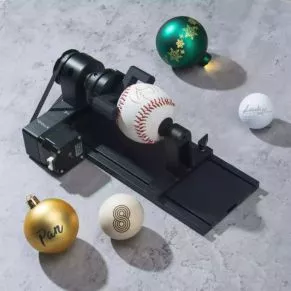
Bestseller
$319.00
4-in-1 rotary engraving system
This RA2 Pro rotary system enables precise engraving on cylinders, rings, spheres, and irregular objects. Designed for maximum versatility, it supports multiple rotary modes with stable positioning and accurate alignment. Ideal for expanding laser machine capabilities, it ensures consistent results across complex curved surfaces and supports creative, high-detail personalization projects.
Multi Rotary Modes
Versatile object handling
Precision Alignment System
Accurate engraving setup
Curved Surface Support
Cylinders rings spheres
Batch Workflow Boost
Faster production output
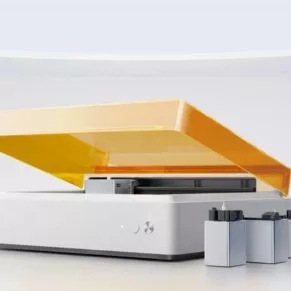
Bestseller
$899.00
4-in-1 smart crafting laser system
The xTool M1 Ultra is a powerful all-in-one crafting machine combining laser cutting, engraving, inkjet printing, blade cutting, and pen drawing in one system. Designed for creators and small businesses, it processes 1000+ materials with precision, fast switching, and smart software control for efficient, high-quality, multi-functional creative production workflows.
Four In One System
Laser print cut draw
Material Versatility Range
1000 plus materials supported
Fast Module Switching
Three second swap system
Smart Design Software
AI powered workflow tools
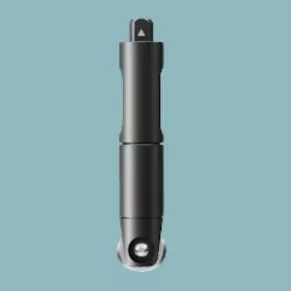
Bestseller
$10.00
Precise cutting replacement tool
The Fine-point Blade for M1 Ultra is a precision cutting accessory designed for clean, accurate cuts on paper, cardstock, vinyl, and similar materials. It delivers smooth edges for detailed designs and craft projects, making it ideal for replacements or upgrades to maintain consistent cutting performance and high-quality creative output.
Precision Cutting Blade
Sharp clean edge results
Paper Vinyl Compatibility
Works on thin materials
Smooth Detail Performance
Accurate intricate design cuts
Easy Replacement Tool
Quick simple blade swap
Maximum value, zero compromise.
The machine is only the starting point. A truly complete beginner setup includes the accessories that make your first projects clean, safe, and repeatable — not a wishlist of add-ons to buy later. A honeycomb panel, basic air assist, and a riser base cover the majority of beginner project needs without pushing the total spend past the thousand-dollar mark when chosen thoughtfully from the start.
The Honeycomb Panel
Raises material off the bed, reduces underside burn marks, and improves overall cut quality on wood and acrylic.
Air Assist Basics
Keeps smoke away from the lens and produces cleaner, sharper cut edges on every project.
Riser Base Utility
Adds clearance for thicker materials, expanding what you can work on from the start.
Essential Alignment Tooling
Simple positioning aids (like corner guides or jig stops) help ensure repeatable placement and reduce wasted material during early learning.
Accessories complete the setup.
Starting with the right projects builds foundational confidence faster than anything else. Simple engravings on wood, name plaques, and basic acrylic cuts give you clean, rewarding results quickly — proof that the machine works, proof that you can operate it, and the first finished pieces you’ll want to show people or sell.
xTool’s beginner-friendly ecosystem means that first project success isn’t accidental — it’s designed in. Pre-set material profiles, camera-assisted placement, and responsive community support combine to make the learning curve genuinely manageable, turning complete newcomers into capable makers within their first few focused sessions at the machine.
 Français
  English
  Español
  한국어
한국어