Every laser setup has a ceiling — and more often than not, it’s not the machine holding you back, it’s the accessories around it. The right add-ons eliminate bottlenecks, reduce setup time, and turn a capable laser into a genuinely efficient production tool. Here’s what actually moves the needle.
The Add-ons That Separate Fast Makers from Frustrated Ones
- Rotary attachments unlock curved surface engraving instantly
- Riser bases create clearance for thicker, bulkier materials
- Honeycomb panels improve airflow and cut quality significantly
- Extension kits expand usable work area without changing machines
Most makers underestimate how much time they lose to poor material hold-down, misaligned workpieces, and single-task setups. xTool’s accessory ecosystem is designed specifically to close those gaps — giving creators the support structures, enclosures, and positioning tools that transform a standard session into a high-output workflow without adding complexity or learning curve to the process.
Rotary attachment
Makes cylinders (tumblers, rings, bottles) easy, fast, and repeatable to engrave
Enclosure + air assist
Cleaner cuts, better edge quality, and reduced smoke/debris buildup
Material hold-down
Keeps materials stable to prevent shifting, misalignment, and waste in batch work
Investing in the right accessories isn’t an optional upgrade — it’s the difference between a laser that sits at 60% efficiency and one running at full productive capacity. xTool’s modular add-on range is built so each piece integrates cleanly with the next, letting creators build out their setup incrementally without compatibility headaches or redundant purchases cluttering the workspace.
Small setup flaws quietly bleed your productivity, turning high-end machines into underperforming tools every single session.
Setup makes output
The Add-ons Our Community Can't Stop Recommending: Top Workflow Picks
Talk to any high-volume xTool user and the conversation shifts quickly from the machine itself to the accessories that made it work for their specific workflow. Rotary attachments, air assist upgrades, and riser kits consistently top the list — not because they’re the flashiest additions, but because they solve real, recurring friction points that slow production and chip away at the creative momentum every serious maker needs to protect.
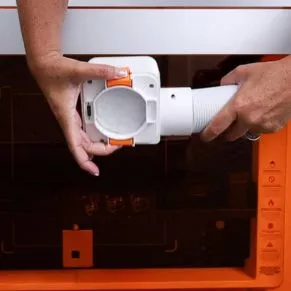
Bestseller
$46.90
Clean airflow laser smoke control
This smoke exhaust module helps remove laser-generated smoke and fumes efficiently during engraving and cutting tasks. It improves air quality, reduces residue buildup inside the machine, and supports stable operation. The result is a cleaner workspace and more consistent performance during extended creative or production workflows.
Smoke Removal System
Fast fume control
Air Protection Upgrade
Cleaner workspace output
Component Shield Layer
Prevents internal buildup
Stable Performance Boost
Consistent workflow support
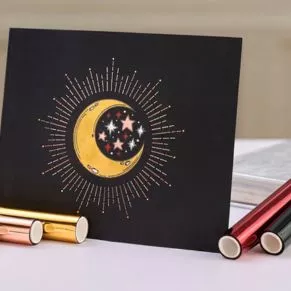
Bestseller
$89.00
Precision metallic foiling tool
The Hot Foil Pen for M1 Ultra enables heat-based foil transfer for sharp, durable metallic finishes on materials like paper, leather, and acrylic. It delivers cleaner results than pressure-based methods, offering precise detailing, bold decorative effects, and long-lasting shine for professional-quality craft personalization and creative design projects.
Heat Foil Transfer System
Clean metallic finish output
Multi Tip Control Options
Fine to bold detailing
Material Versatility Support Range
Paper leather acrylic compatible
Durable Shine Finish Quality
Long lasting vibrant results

Bestseller
$99.00
Stable hold clean cutting surface
This electrostatic mat provides strong, adhesive-free material hold for precise cutting, printing, and foiling on the M1 Ultra. It prevents curling, reduces waste, and improves workflow cleanliness. Ideal for delicate materials, it ensures stable positioning, easy cleanup, and consistent results across repeated crafting and production tasks.
Static Hold System
Strong material grip
Curl Free Cutting
Flat precise output
Easy Clean Surface
No residue buildup
Cost Efficient Desig
Long lasting use
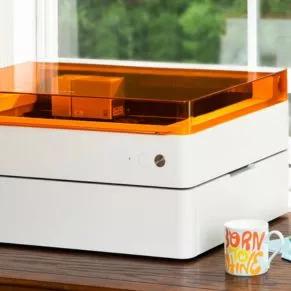
Bestseller
$199.00
Raised platform expands engraving range
This riser base kit elevates the M1 Ultra working space, allowing thicker materials and rotary projects with greater flexibility. It enhances engraving depth, stability, and precision while maintaining secure support. The honeycomb structure improves airflow and reduces burn marks, making it ideal for detailed, high-quality creative production workflows.
Height Expansion Upgrade
Supports thick materials
Rotary Ready Design
Enables curved engraving
Stable Honeycomb Base
Reduces vibration shift
Pre Assembled Setup
Ready out box
Community-tested, workflow-approved.
Not every accessory earns its place in every setup. A jeweler running infrared engravings on flat metal needs different support tools than a leather studio cutting shaped panels or a merch maker engraving cylindrical tumblers at volume. Understanding which bottlenecks actually exist in your current workflow is the only honest starting point for deciding which add-ons are genuine upgrades versus ones that collect dust on a shelf.
For High-Volume Batch Work
Honeycomb panels with hold-down pins speed up repeat setups and keep multiple pieces aligned for efficient batch engraving.
For Curved and Cylindrical Projects
A dual-roller rotary attachment enables engraving on glasses, bottles, and rings with consistent rotation control.
For Thick or Oversized Materials
A riser base increases clearance, allowing engraving on bulky items like wood slabs and layered materials.
For Precision Alignment Workflows
Camera-assisted positioning systems reduce manual alignment time and improve placement accuracy for detailed or repeatable designs.
Right tool, right job.
The smartest accessory strategy starts with one clear question: where am I losing the most time right now? Chasing a fully kitted setup from day one leads to redundant purchases and accessories that don’t match your actual production reality at that stage of your creative business.
Start with the single add-on that solves your biggest recurring friction point, run it hard, and let the next gap reveal itself naturally. xTool’s accessory lineup is built for exactly this kind of incremental growth — each addition integrates cleanly into an existing setup, meaning your stack evolves with your workflow rather than ahead of it, keeping every purchase justified by the output it directly enables.
 English
  Français
  Español
  한국어
한국어